Posts

Steps to share files, photos, videos between Windows Phone, Android Phone and iPhone.

Image
Yes You can transfer files from Android phone to Windows phone and vice versa using SHARE it App. The procedure is written below with images for better understanding. 1) Open SHARE it app on Android phone and press SEND button. 2) On clicking that you would be asked with the following screen. Press SKIP . 3) Now select the files you want to share. Please note that Windows phone won’t accept folders. So don’t select whole folder instead just select separate files you want to share. After selecting files press SEND button. 4) Now you will get the following screen. Just press connect to iOS/WP . 5) Press continue . 6) You will get the following screen on Android. App will create Wi-Fi hotspot on your phone with any random name. It will show the name of the hotspot on your screen. 7) Open SHAREit app on windows phone and press receive . 8) On clicking receive, you will get following screen saying “Connect to Wi-Fi” in Current WLAN box. 9) Open Wi-Fi s...
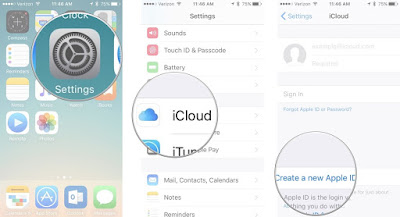

How to create a new Apple ID on your iPhone or iPad

Image
New to the Apple ecosystem? Your first step is to sign up for an Apple ID. An Apple ID makes it possible for you to download content from iTunes and the App Store. It also allows you to sync reminders, calendars, and contacts through iCloud, and activates FaceTime and iMessage across multiple devices. It's not mandatory to sign up for an Apple ID if you want to use an Apple device, but it is essential to getting the most out of your iPhone and iPad. Here's how you can create a new ID. How to create a new Apple ID on your iPhone or iPad Open the Settings app. Tap iCloud. Tap Create a new Apple ID. Enter a birth date. Tap Next. Enter your first and last name. Tap Next. Select your current email address or get a new iCloud email address. Enter your email address. Create a password. Verify the password. Select a security question. Type in answer. Repeat two more times. Agree to the Terms and Conditions. Tap Merge or Don't Merge to sync iCloud da...

10 Quick Scientific Facts that Will Blow Your mind

Image
Why aren’t there that many people into science? Personally, I believe it has something to do with how it’s being communicated and, not least, how it’s being taught in school. Raw science and data do not drive people – fun, emotional and persuasive narratives do.  We live in a world where we need people like Bill Nye to get up and be scientific, but also silly and fun. Is this so wrong? It’s debatable, but honestly I can understand why some hardcore scientists cringe at the idea of ‘popular science’. Nevertheless, what some of these top scientists might forget is that they got into their fields because of some popular science movement in the first place, be it the Apollo missions, a computer science program on PBS or one inspiring afternoon working out back when your neighbor explained how a car works. With this in mind, here are just ten amazing things that I’ve come to learn thanks to the progress of science. It’s this sort of knowledge that’s inspired me to learn more every da...

The Complete Guide to Gmail - Lesson 2: The Mobile App, Composing Mail, and Conversations

Image
A Tour of the Mobile App By default, the Gmail app opens to your inbox. Change Accounts and Select Tabs and Labels The “Gmail” menu, available by touching the Gmail icon in the upper left corner of the screen, allows you to view your Gmail accounts, access the different tabs in your inbox and view messages by label. Change Settings, Refresh Your Inbox, and Get Help Pressing the menu button on your phone allows you to change general and label settings, refresh your inbox to make sure you get new messages, send feedback, and get help. The “Settings” screen allows you to change general settings for Gmail and settings specific to each account you have setup on your phone. Touch “General settings” to open a screen that allows you to specify various settings that apply to all Gmail accounts. Once you make your changes, press the “Back” button on your phone to return to the “Settings” screen. To return to the inbox, press the “Back” button again. To change settin...